

Key Takeaways
Why a Maintenance Log Is Worth the Effort
Most drivers know they should keep up with oil changes and tire rotations, but far fewer keep a written record of what was done and when. That gap matters more than it might seem. A detailed maintenance log serves three distinct purposes: it keeps you on schedule with upcoming services, it provides documented proof of care if a warranty question arises, and it supports a stronger case for the vehicle's value when it comes time to sell.
Prospective buyers and dealerships treat a complete service history as evidence of a well-cared-for vehicle. Deferred or undocumented maintenance, by contrast, raises questions that can erode buyer confidence - even if the car runs perfectly. As noted in our overview of keeping car ownership costs manageable, proactive habits like logging services help prevent the kind of deferred maintenance that compounds into large, unexpected repair bills. You can also explore the real cost of skipping routine maintenance for a detailed look at how gaps in service history affect long-term expenses.
Don't Rely Solely on the Dealer's Records
Dealerships and independent shops retain their own service records, but those files can be incomplete, archived, or inaccessible if a business closes or changes ownership. Keeping your own log ensures you always have a full picture of your vehicle's history, regardless of where the work was done.
What You'll Need Before You Start
Setting up a log requires minimal materials, but having the right ones in place from the start makes the habit stick.
What you will need
Dedicated logbook or notebook
Records service dates, mileage, work performed, and costs in a single physical document kept with the vehicle.
Smartphone or tablet
Allows you to use a maintenance-tracking app or spreadsheet for digital record-keeping.
Vehicle owner's manual
Provides the manufacturer's recommended service intervals so you know what to log and when.
Service receipts and invoices
Source documents that confirm work was completed, parts used, and costs paid - filed alongside log entries.
How to Build and Maintain Your Log
Follow the steps below to create a log that works for your vehicle and your routine. The entire setup should take under 30 minutes for most drivers, and maintaining it takes only a few minutes after each service visit.
Choose Your Format
Decide whether you prefer a physical logbook stored in your glove box or a digital solution such as a spreadsheet or dedicated app. Both approaches work well; the key is picking one you will actually use consistently. A simple spiral notebook costs almost nothing and requires no setup. Digital tools can send service reminders automatically, which some drivers find more reliable. Whatever format you choose, commit to it before your next service appointment.
Gather Your Existing Records
Pull together every service receipt, inspection certificate, and repair invoice you can find. Check the glove box, your email inbox for shop confirmations, and any dealer portals where your vehicle's history may be stored. Log each past service entry you can verify: date, odometer reading, work performed, shop or dealer name, and cost. Starting with a complete historical picture is ideal, but even a partial record is valuable - note any gaps clearly so you know where your history is uncertain.
Establish Your Log Entry Format
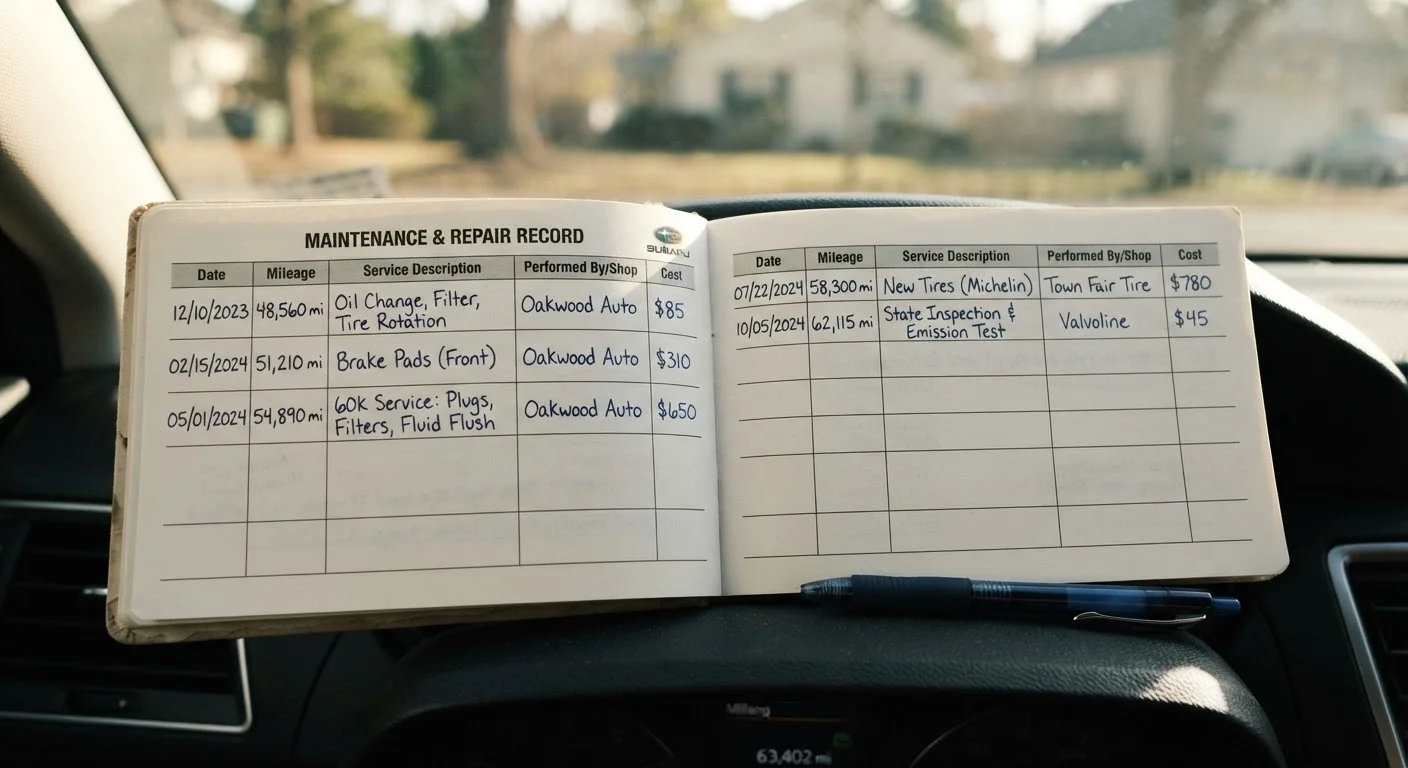
Every entry should include at minimum: the date of service, current odometer reading, description of work done, parts replaced (with part type if known), name of the shop or mechanic, and total cost. Consistent formatting makes the log easy to scan quickly. For a paper log, draw a simple table with those column headers. For a spreadsheet, one row per service event works well. Standardized entries prevent confusion and make it clear at a glance whether a service was routine or a repair.
Cross-Reference with Your Maintenance Schedule
Compare your log against the manufacturer's recommended intervals outlined in your owner's manual. Your maintenance schedule specifies mileage or time triggers for oil changes, filter replacements, brake inspections, tire rotations, and more. Identify any services that are overdue based on your current mileage and schedule them promptly. This step transforms your log from a passive record into an active planning tool.
Update the Log After Every Service
Make logging a non-negotiable step immediately after each service visit - before you leave the parking lot if possible. Record the details while the receipt is in hand and the specifics are fresh. Delayed entries are more likely to be skipped or filled in inaccurately. If work is done across multiple visits for the same issue, log each appointment separately so the full repair history is traceable.
Store and Protect Your Records
Physical logs belong in a waterproof sleeve or folder in your glove box or home files. Pair them with original receipts in a labeled binder. For digital records, back up to a cloud storage folder you control and export a PDF copy annually. See our guide on documents every car owner should keep for a broader look at organizing all your vehicle paperwork in one accessible place.
Photograph Receipts as a Backup
Thermal paper receipts from service shops fade within a few years. Snapping a photo of each receipt immediately after a service and storing it in a dedicated folder - cloud or local - keeps your records legible long-term. Pair photos with your written log entries for a complete paper trail.
Making the Most of Your Records Over Time
A maintenance log grows more valuable the longer you keep it. As your vehicle accumulates mileage, the record becomes a reference point for predicting upcoming needs - particularly important for drivers navigating high-mileage vehicle care, where service demands shift and documentation of past work becomes especially relevant.
Review your log at least once every six months. Look for patterns - recurring issues with the same system can point to an underlying problem worth discussing with a qualified mechanic. A log also removes the guesswork from conversations at the shop: you arrive knowing exactly what has been done and when, which helps you evaluate any recommended services with more confidence.
Digital Apps Can Disappear - Back Up Your Data
Maintenance-tracking apps are convenient, but apps get discontinued and accounts can be lost. Export or print your records periodically and store them with your other vehicle documents so you are never caught without a history when you need it most.